
Minimum Deposit, UPI And USDT Options To Recharge Jalwa Game
A Jalwa Game deposit can be made in two ways: UPI or USDT. With UPI you can add ₹100 to ₹50,000 per deposit, and the USDT channel shows a range of 10 to 100K. You start from the Deposit button on the home screen or inside Wallet.
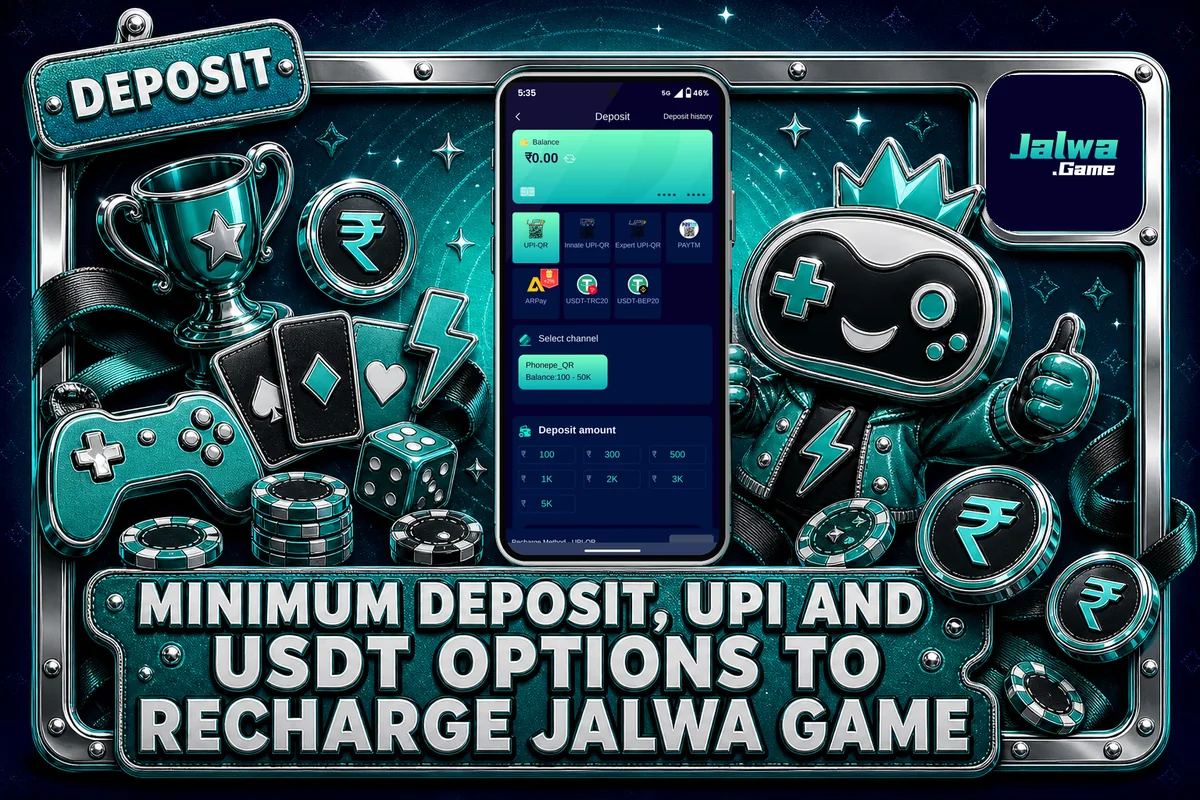
Most deposit problems start with one tiny mistake: the amount you pay does not match the amount shown on your order. Here you will find the exact steps, the limits that hold for every payment method, how confirmation is processed, and the action to take when your bank has debited the money but your balance still shows no change.
How A Jalwa Game Deposit Works Inside The Wallet
Every deposit on Jalwa Game starts with an order. You pick UPI or USDT, choose a channel and type the amount, and the app creates an order for that exact figure. Your payment is then checked against this order before the money reaches your balance, so the Jalwa Game deposit flow always begins with that order.
This is why the app is strict about amounts. If the order says ₹500 and you send ₹499 or ₹501, the system cannot match the two, and your credit gets stuck. The rule is written into the account rules: the transfer amount must match the order you created.
You need an account before making a first deposit. If you do not have one, go through how to sign up and use the invite code 4961211804045, after which you can log in using your phone number or email along with your password.
Steps To Make A Jalwa Game Deposit Using UPI Or USDT
Follow these steps in order. Keep your UPI app or USDT wallet ready before you tap Submit on the Jalwa Game deposit page, so the order does not sit open for long.
Log in and tap Deposit from the home screen or from Wallet.
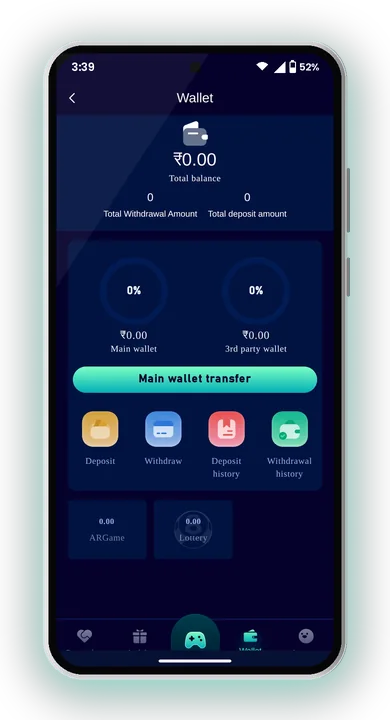
Pick UPI or USDT. UPI suits most players paying from an Indian bank account.
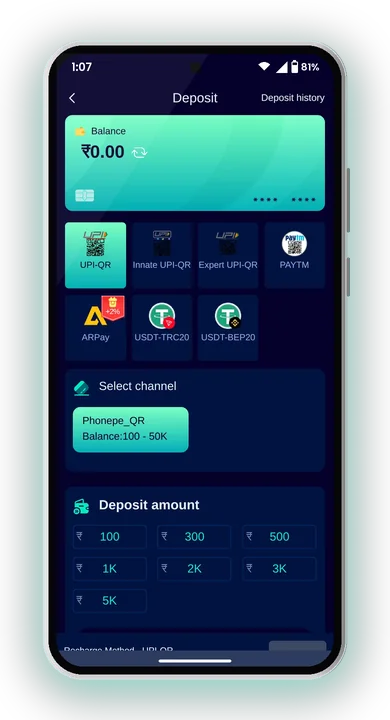
Tap one of the channels shown under your method. They all lead to the same type of payment.
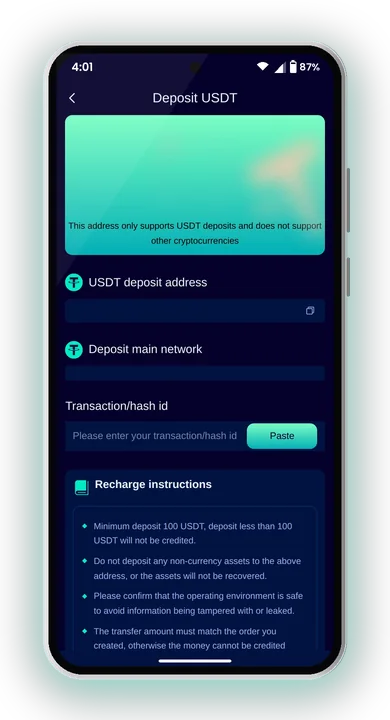
Type the deposit amount within the allowed range for that method.
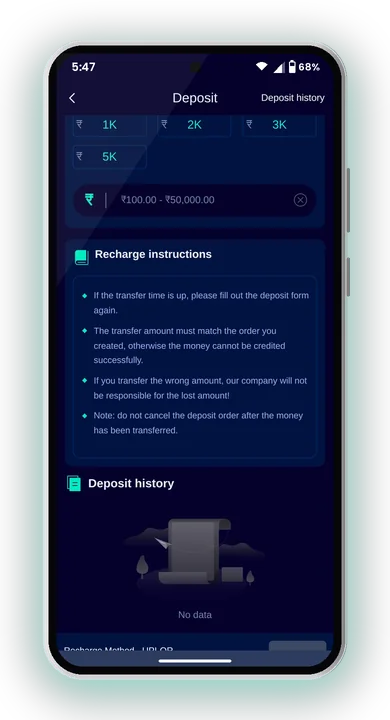
Tap Submit. Note the exact amount on the order screen.
Complete the payment from your UPI app, or send the correct USDT amount, then wait for confirmation.
After confirmation, the amount shows in your Wallet balance and you can play any game in the lobby.
Deposit Limits For UPI And USDT
Each method has its own range. Pick an amount inside it, or the Jalwa Game deposit order will not go through.
| Method | Deposit range | Notes |
|---|---|---|
| UPI | ₹100 to ₹50,000 per deposit | Pay with any UPI app such as PhonePe, Google Pay or Paytm |
| USDT | 10 – 100K | Shown on the TRX channel; check the network before sending |
To put in over ₹50,000 via UPI, split the amount into several deposits, and each of them must be a fresh order. Before a big deposit, look in the app to see whether the present limit has changed.
Paying With UPI: What To Check
UPI is the simpler choice for most Indian players. After you submit the Jalwa Game deposit order, you pay from your own UPI app, and the money is matched to your account.
Two habits save time. First, pay from an account in your own name, since Jalwa Game wants the same name on your payment details and your account. Second, finish the payment soon after you submit, instead of leaving the Jalwa Game deposit order open and coming back later.
Type The Amount Exactly
When your UPI app opens, check the amount field. If it is blank, type the order figure digit by digit, including any paise shown. Do not round it off.
Keep Your UTR Number
Your UPI app gives a transaction reference, often called the UTR. Take a screenshot of the success screen. Customer Care will ask for it if the money does not arrive.
Sending USDT The Right Way
USDT deposits use a crypto wallet instead of a bank app. The channel inside Jalwagame shows the TRX network, so the coin must be sent on TRC20.
Crypto transfers cannot be pulled back. Sending on the wrong network or to a wrong address can mean the money is lost, so check every detail of your Jalwa Game deposit before you confirm.
Match The Network
Choose TRC20 in your wallet when sending. If your wallet offers several networks, do not pick a different one just because the fee looks lower.
Copy The Address, Do Not Type It
Tap the copy button to take the address, then paste it in your wallet. Before sending the right USDT amount, match the first few and last few characters of the pasted address with the original.
Allow Time For Confirmation
Blockchain transfers need network confirmation before the platform can credit you. Wait a little before raising a complaint.
Common Jalwa Game Deposit Problems And Fixes
A handful of patterns account for most deposits that get stuck. The usual causes and the fixes for them are listed here for any Jalwa Game deposit problem.
Money Debited But Balance Not Updated
Wait a short while first, as confirmation is not always instant. If it still does not show, go to Account → Customer Service, start a chat and share your order details and UTR screenshot. Support is available 24×7.
Amount Did Not Match The Order
This is the most common cause. Tell Customer Care the exact amount sent and the order amount. Next time, copy the figure exactly.
Fake Support Messages
Jalwa Game customer service never sends links to members. If someone on Telegram or WhatsApp sends a payment link claiming to fix your deposit, ignore it. Only use the chat inside the app.
Bonuses Linked To Your Deposits
Deposits connect to a few rewards. The Member First Deposit Bonus gives new members extra balance on their first deposit, in slabs by deposit size. The Cumulative 10 Days Recharge Bonus adds up your Jalwa Game deposit totals over 10 days and unlocks a reward at each level reached.
Bonus balance usually comes with a betting requirement. Before you can withdraw, your remaining betting requirement must be 0, so read the activity terms in the app before you make a Jalwa Game deposit for a bonus. One person should keep one account, since rewards claimed with the same phone, email, bank account or IP can be cancelled.
Safe Deposit Habits And Responsible Play
Jalwa Game is for adults aged 18 and above, and it uses real money. Game results are random, so you can lose what you add. Set a fixed playing budget and deposit only that amount, never money meant for bills or rent.
Install the app only by using the download button on the Jalwa Game website, as it cannot be found on Google Play. No Jalwa Game Hack or predictor app is able to change results; these tools are scams designed to take your money or your login details. Real-money gaming rules differ from one state to another, so check what applies in your area.
Plan your exit too. Withdrawals go up to 3 per day, and the name on your payout method must match your account. For full details, read about sending winnings to your bank before your first request.
Jalwa Game Deposit – FAQs
What is the minimum Jalwa Game deposit through UPI?
The UPI range is ₹100 to ₹50,000 per deposit. For larger amounts, make separate deposits.
Which payment methods can I use to recharge?
You can use UPI, paying from any UPI app such as PhonePe, Google Pay or Paytm, or USDT on the TRX channel, which shows a range of 10 to 100K.
Why is my deposit not showing in my balance?
The usual reason is an amount that does not match the order, or confirmation still pending. Contact Customer Care through Account → Customer Service with your UTR screenshot.
Can I deposit from someone else’s account?
It is better not to. Jalwa Game asks you to keep the same name on your payment details and your account, which avoids problems later when you withdraw.
Summing Up
A smooth Jalwa Game deposit comes down to three things: pick UPI or USDT, stay inside the limit, and send the exact order amount. Keep your payment proof until the balance updates.
Only play if you are at least 18 years old, decide on a fixed budget, and remember that no result is ever guaranteed. You can get the app download and log in through Jalwa Game.